LeagueLineup shut down on August 31, 2026. Move your league to DugoutHQ →

TeamLinkt help articles read October 21, 2026

Switch From TeamLinkt: Export Your League Data

TeamLinkt has no direct connection to DugoutHQ. Its help centre shows how to export registrations from Reporting and team rosters as CSV. Here are those steps, taken from TeamLinkt's own articles, and what happens after you send the files to us.

Step 1

Export From TeamLinkt

These steps come from TeamLinkt's own help centre, linked under each one. Menus change; if a button has moved, the linked article is the latest word.

Registrations (organization admins)

  1. Open Reporting.
  2. Set the report type to All Registrations and leave the style as Records.
  3. Filter by form, registration status, payment status or date, or use a saved filter.
  4. Run the report, then use Export (or Actions) to download it.

To include answers to your custom registration questions, go to Registration → Participants, choose the forms, turn on Show Custom Questions, select everyone and use Actions → Export Participants.

Source: TeamLinkt help: Export Registrations (dated December 6, 2024), read October 21, 2026.
A team roster (team admins)

  1. Sign in at app.teamlinkt.com on a computer.
  2. Choose the team from the dropdown in the top right.
  3. Click Rosters in the left menu.
  4. Click Export Roster in the top right to download a CSV.

Source: TeamLinkt help: Export Team Roster (dated December 3, 2024), read October 21, 2026.

What the exports leave behind

  • Schedules: we found no schedule export in TeamLinkt's help centre (checked October 21, 2026). Send us a screenshot or your schedule spreadsheet; DugoutHQ can also generate a fresh schedule in minutes
  • Chat history and photos
  • Payment records beyond the registration report: download what your treasurer needs from your payment reports

Step 2

We Rebuild Your League

1. Send us your league details

Fill in the form below with your league name and tell us you are coming from TeamLinkt. That is all we need to start.

2. We tell you where to look

We look at how your league was set up and send back a specific list of what we need and where it usually survives — your own files, old emails, captains’ spreadsheets, archived pages. Not a generic checklist.

3. We do the rebuilding

You send us the files. We run them through our bulk importers — schedules, rosters, free agents, and stats all load from spreadsheets — and set up your divisions, standings rules, and league site.

4. You review, then go live

Nothing is public until you say so. Check the rosters, fix what we got wrong, and publish when your season is ready.

Screenshots

Where Your League Lands

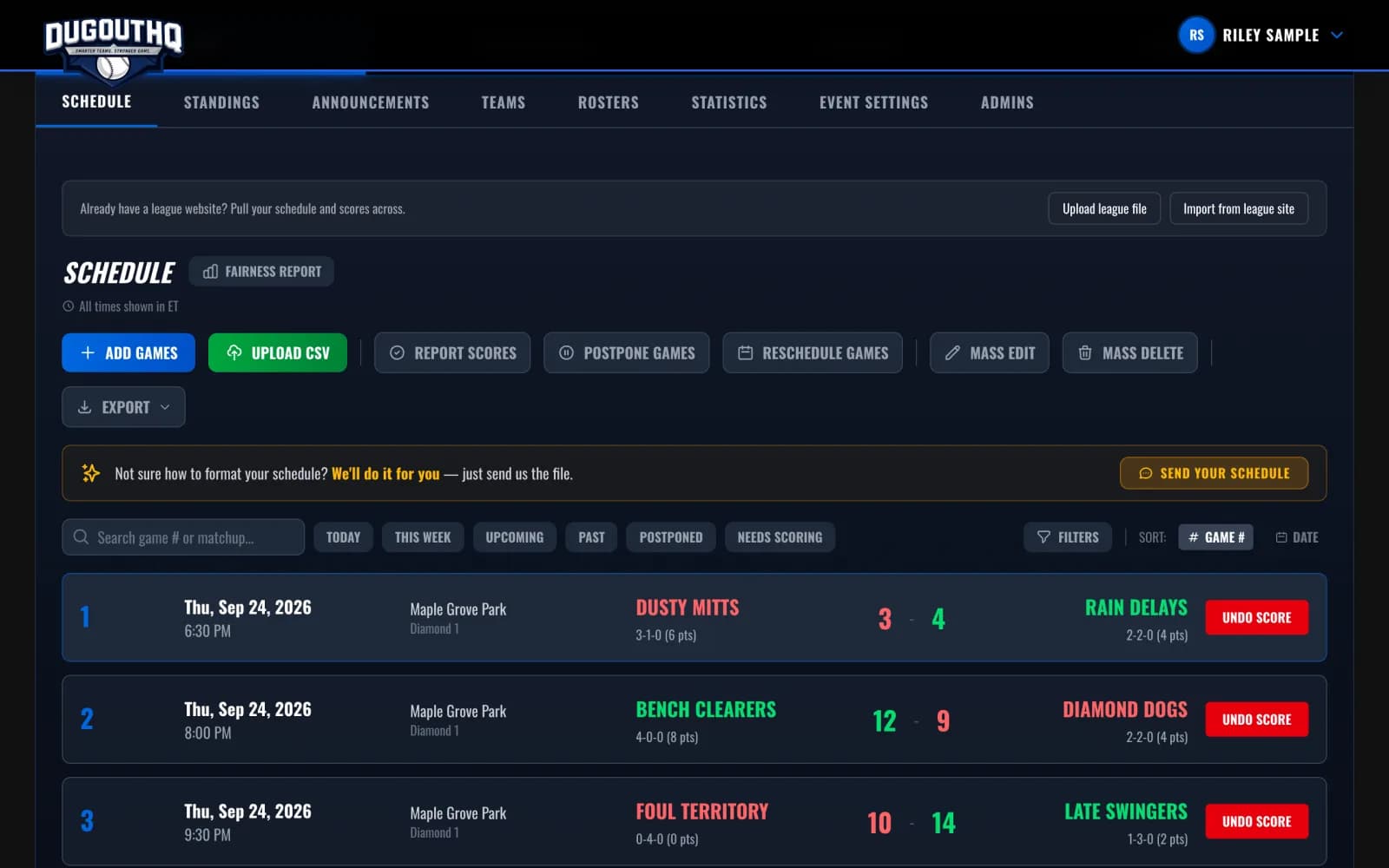
DugoutHQ schedule tools: add games, upload a CSV, report scores, reschedule, export, and import from a league file
Schedule tools, including CSV upload and importing from an existing league file or site.
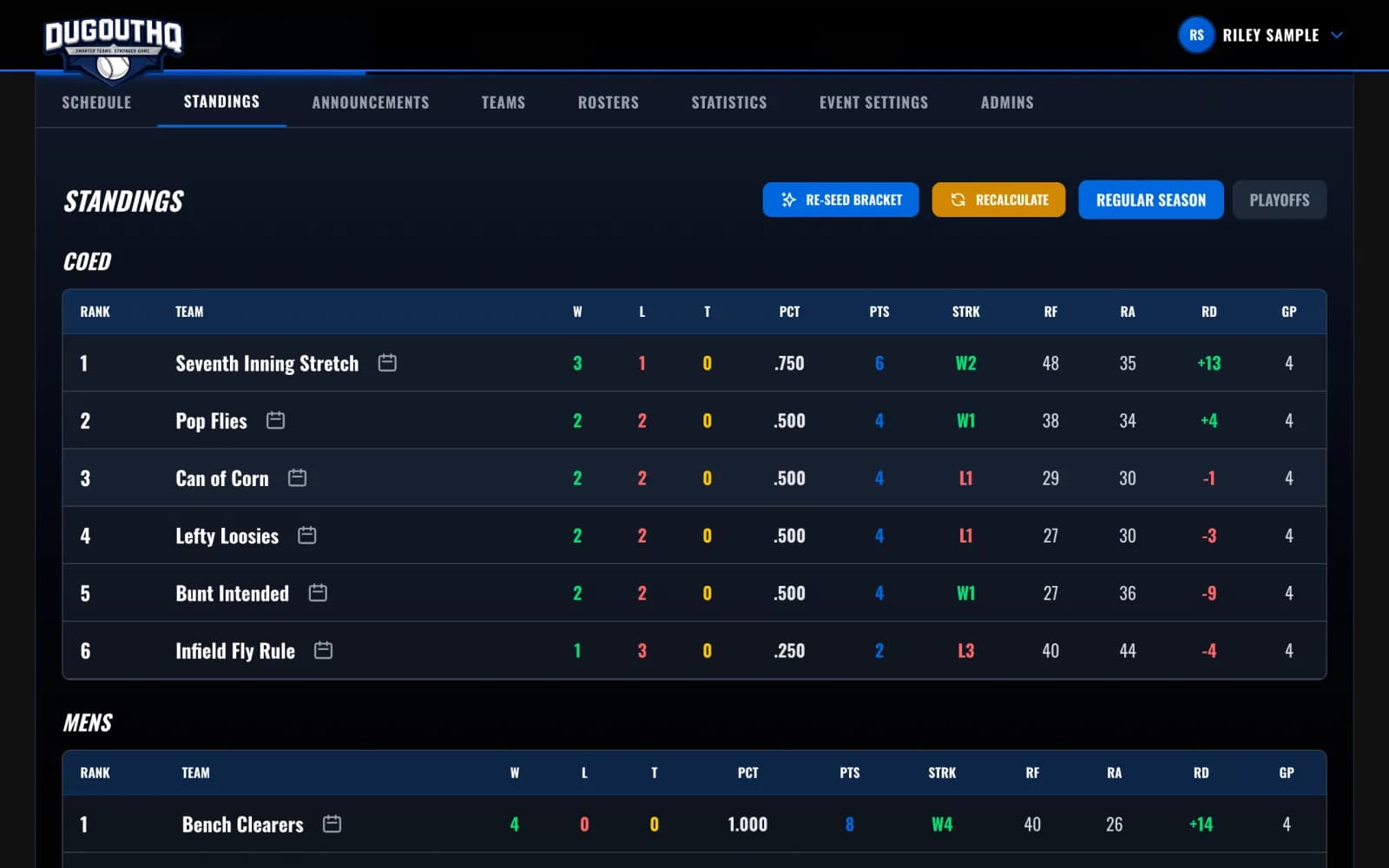
DugoutHQ league standings for two divisions, with wins, losses, points, streak and run differential
Standings update as scores are reported: points, streak and run differential for every division.

Screenshots from DugoutHQ with a made-up demo league.

Free, no account needed

Tell Us About Your League

Where you are now, roughly how big you are, and what you are worried about losing. We come back with a plan. Running your league on DugoutHQ is free; the only fee is 5% on registrations collected by card.

We use these details only to reply to you about moving your league. No obligation, no mailing list, and you can ask us to delete them at any time — see our privacy policy. Prefer email? hello@dugouthq.com

Still Deciding?

FAQ

Does DugoutHQ import directly from TeamLinkt?

No. There is no direct integration. You export spreadsheets from TeamLinkt, and we load them with our bulk importers, then finish the setup by hand.

What does the move cost?

Nothing. We rebuild the league for free, and running it on DugoutHQ is free; the only fee is 5% on registrations collected by card.

We run other sports on TeamLinkt too. Can we move only baseball?

Yes. DugoutHQ is baseball, softball and slo-pitch only, so the rest of your association can stay where it is.

More Comparisons